Hi everyone,
I’m trying to run OpenEMS using Docker on Ubuntu. Both containers start successfully:
The Edge container works fine — I can access Apache on port 8080 and see logs from the Edge container. However, the UI does not connect. When I open the browser and go to http://localhost (or port 80), the page does not load.
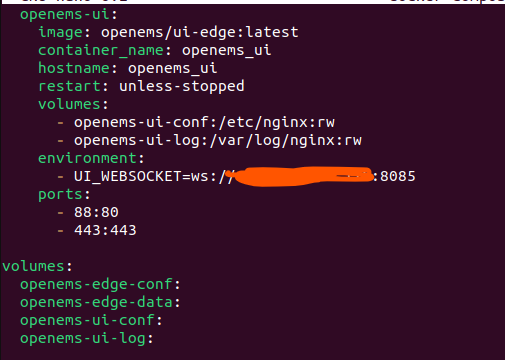
Here’s the relevant part of my docker-compose.yml:
I tried changing ports (e.g., 88:80) and restarting Docker, but the UI still doesn’t show up.
Has anyone experienced this? Why does Edge start and run normally but the UI container cannot be accessed through the browser?
Any help or suggestions would be appreciated!
Sn0w3y
November 14, 2025, 7:14am
2
Hi @CongDanhES ,
The documentation could definitely be more detailed. I actually have a PR open to update the Docker docs. #3391
That said, I haven’t encountered any issues with the Docker setup using this Docker Compose file:
services:
  openems-edge:
    image: openems/edge:latest
    container_name: openems_edge
    hostname: openems_edge
    restart: unless-stopped
    volumes:
      - openems-edge-conf:/var/opt/openems/config:rw
      - openems-edge-data:/var/opt/openems/data:rw
    ports:
      - 8080:8080 # Apache-Felix
      - 8085:8085 # UI-Websocket

  openems-ui:
    image: openems/ui-edge:latest
    container_name: openems_ui
    hostname: openems_ui
    restart: unless-stopped
    volumes:
      - openems-ui-conf:/etc/nginx:rw
      - openems-ui-log:/var/log/nginx:rw
    environment:
      - WEBSOCKET_HOST=openems_edge
      - WEBSOCKET_PORT=8085
    ports:
      - 80:80
      - 443:443

volumes:
  openems-edge-conf:
  openems-edge-data:
  openems-ui-conf:
  openems-ui-log:
1 Like
sjjh
November 16, 2025, 2:44pm
3
UI_WEBSOCKET was recently replaced by
      - WEBSOCKET_HOST=openems_edge
      - WEBSOCKET_PORT=8085
HTH
1 Like