JSCalendar UI Implementation

Hi yall,

I’m currently looking into creating a UI for the JS-Calendar Scheduler Feature.
I have and still am discussing the exact details with my company’s designer and Frontend Dev.

The current plan is to implement two widgets and one new page dedicated to an interactive calendar.

The Widgets are as following:

  1. A quick look up Widget to see which controller(s) are active and what change will be next.
    Like:
    • Currently Active: ctrl0, ctrl1
      Changes at: 13:15:00
    • Next Controller: ctrl1, ctrl3
      Starts at: 13:15:00
  2. A more detailed Widgets to have a brief overlook over the config.
    Like:
    • Ctrl0:
      Active on: [ Mo ] [ Tu ] We [ Th ] Fr Sa So
      During: 08:00:00 - 13:15:00
    • Ctrl1:
      Active on: [ Mo ] [ Tu ] [ We ] [ Th ] [ Fr ] [ Sa ] [ So ]
      During: 10:00:00 - 15:00:00
    • Ctrl3:
      Active on: 21.11.2025 (one time)
      During: 13:15:00 - 18:00:00

The Full Screen Page is even less concrete, but we’ve decided on the following specification:

  • Needs to be an actual Calendar
  • Needs to be able to edit/view hours/week/month
  • New Controllers should be able to be created in this view
  • Everyone with access to an edge should be able to change the calendar

We have found a few Calendar Packages which we could use:

So I am here to ask if anyone already has specific ideas for how this all should work or will be used elsewhere, or concerns with the modularity of this feature given it will be used for more tasks than this one. Or just general input.

I haven’t done actual Frontend code yet, so any feedback before I start is appreciated :smiley:

1 Like

Great to hear, that you want to implement an UI for the JS-Calendar scheduler feature.

There is already a graphical calendar in the UI history, to select a custom date range. IMHO it would be good, if the different calendars look (and behave) the same, to offer consistency to the user.

I don’t know much about the context of (the JS-Calender) scheduler usage. I believe it could be helpful to spend some time understanding the tasks and context (and maybe also user), to derive requirements which should guide the graphical design.
For example, I could imagine that setting up the scheduler component (task) would happen on a computer with a keyboard (context) by someone who is used to administer systems (user). If this is true, a keyboard based text-input possibility in addition to a graphical calendar UI could be helpful.

Before starting coding, a UI wireframe (hand sketched or using a tool like penpot or figma) can help to detail the concept.

Hi @Floschy, thanks for opening this thread!

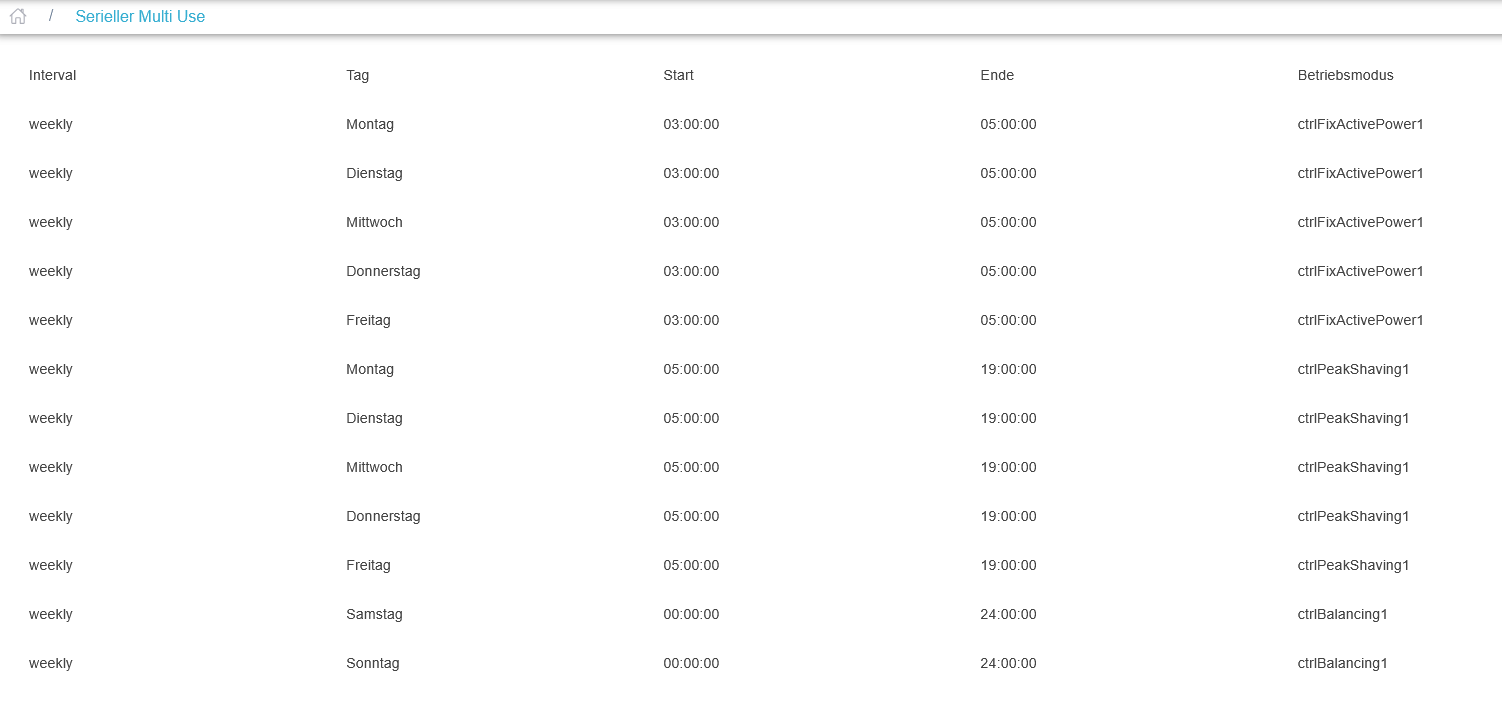
JSCalendar is a very important core feature in OpenEMS and it is going to be used in a lot of places - from JSCalendar-Scheduler, to EV-Charging planning, to Multi-Use ESS applications, etc.

I am curious to hear your ideas on how this could look like. UI wireframes, as suggested by @sjjh, are certainly a very good idea!

I just wanted to let you know, that I added a JSONRPC-Request/Respone for JSCalendar OneTasks in a recent FEMS backport. Maybe you can already use it. There is also a minimum proof of concept of receiving the data in the UI for Controller.IO.HeatingRoom.

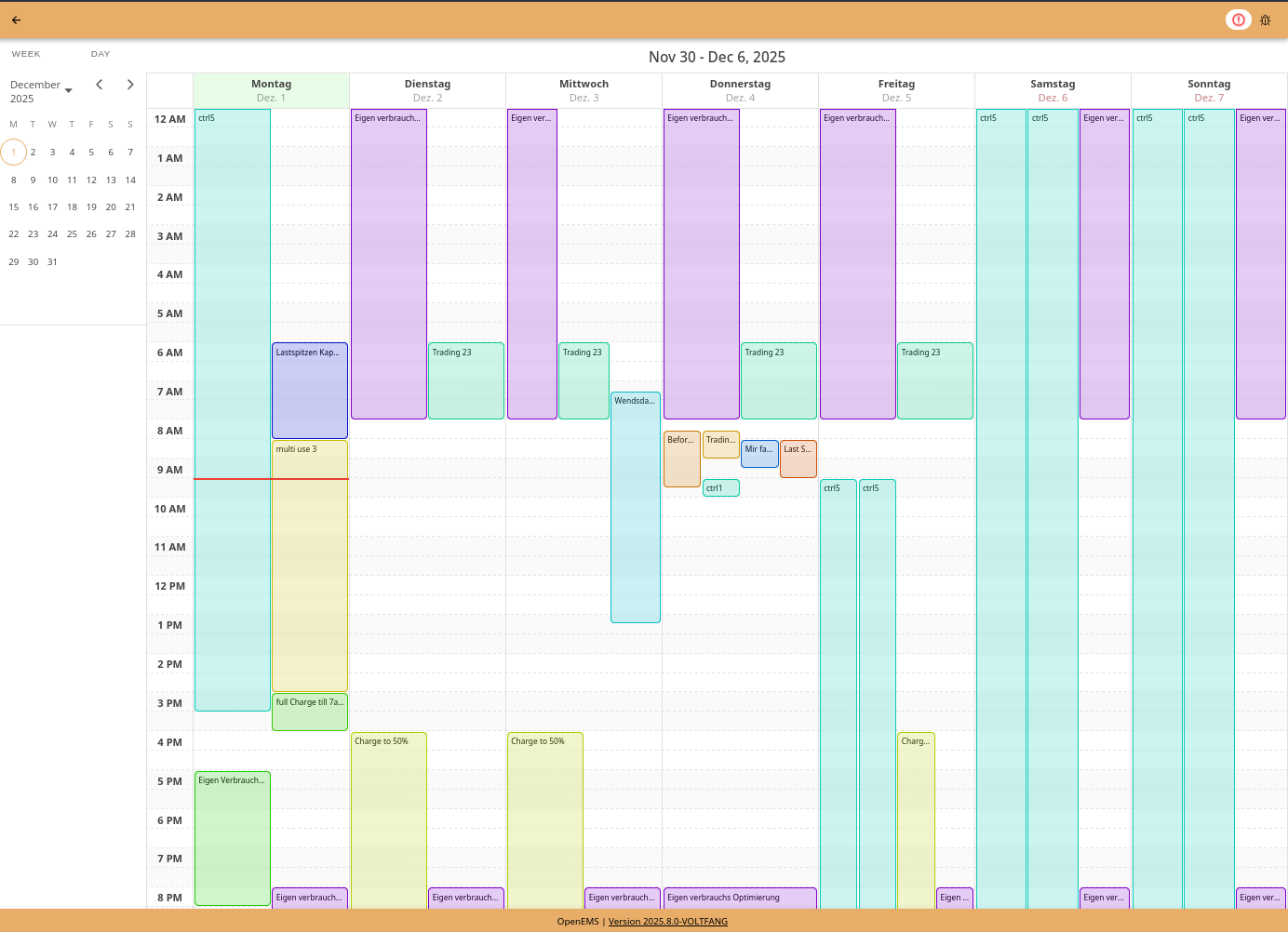
Hey, I already started implementing the Calendar in the UI now. Our UI Designer is ill so im flying blind for the time being and am just trying things out. But here is my current state of things:

Ive decided on using angular-calendar as i feel like it provides the best balance of customization and features.

Ive implemented a Scheduler-Specific JSCalendar “engine” which provides the calendar with the correct events for a given time range, but this engine can be made more generic to support any JSCalendar in the future (payloads). This engine handles recurring events and acts as a translation layer between the JSCalendar data format and the angular-calendar data format. It also supports moving/resizing events and updates recurrence rules accordingly.

To give the user a sense of which events are connected and which aren’t, i am giving each event a name (and all of its recurrence “children”), and based on that name im generating a random but deterministic color. That way the edge doesn’t need to store colors and the calendar will look the same on every device. :smiley:

Regarding using the existing calendar. There are a lot of issues with that:

  • It doesn’t support showing an hour view
  • It is directly linked to the History page and not easily reusable
  • It is build into the component that you cant look into the future
  • => Its out of scope for this feature to generalize that component

Hi @Floschy

Great to hear that you are implementing a UI for JSCalender! Just an idea on how to maybe continue:

It could be a bit simpler and more generic to start with the agenda view.
I don’t feel like more detail is necessarily advantagous as I see the JSCalender mainly used in multi-use applications where the controllers used contradict each other in their optimization goal, but are active at different times.

Agenda view does not support multiple events at the same time very well, e.g. if one is monthly and one weekly. However it is very usable if you only have one regularity at a time (either monthly/ weekly/ daily/ hourly).
I haven’t had an idea how to then go into the specific controller e.g. to change the peak-shaving power. Thats definetly something for a later date. However new events could in theory be added in here. As long as they don’t overlap.


This is just something we drew up. Due to the way we have implemented it, it will have be completely redone.

I didnt really consider not using a calendar to be honest, but its certainly a fair point. Visually displaying Tasks across multiple months while keeping is readable is certainly not / hardly doable. Yeah…
This list view is also easier to implement than an actual Calendar :sweat_smile:

But there must be a way to communicate overlapping schedules. Maybe a yellow (i) symbol which says “overlaps with x, y, z” or when you click the i button it highlights all overlaps?

Another problem I see is overflowing times, meaning: How to communicate Tasks which end the next (or more) days. Since they may be recurring, you cant really give the user a definite date.
A format like “HH:MM:SS (+X days)” could do the trick though.

Additionally there is the question of how to sort Tasks this way? There should be some sense of order but especially with overlaps it could be very confusing.
There is also the problem that one Task can have any amount of Recurrence Rules, should each Rule just be another entry in the list, if so what happens when you change the controller of this one Rule, then suddenly x other rules are effected too…
The Ui could automatically split rules into separate events and merge all Rules with the same Controller(s) to send this to the Edge?

But im 100% onboard with not doing a Calendar

@JanThaeter: Welcome to the OpenEMS Community :slight_smile:

I believe eventually we will have both - calendar view(s) and agenda view - just like your buttons “WEEK” and “DAY” on top left already indicate.

To clarify some technical details:

  • JSCalendar.Tasks by design do not support overlapping OneTask. This is intended behaviour. Instead Tasks respect the priority given by the position in the JSON Array.
    The JUnit tests show this behaviour

  • This also means, that in the UI you do not need to care about the “Recurrence Rules”. Just simply display the OneTasks that you receive from the getOneTasks() request.
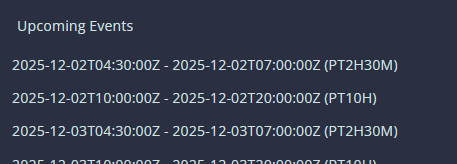
    See this UI code, that produces this very simple agenda view:

Update time :smiley:

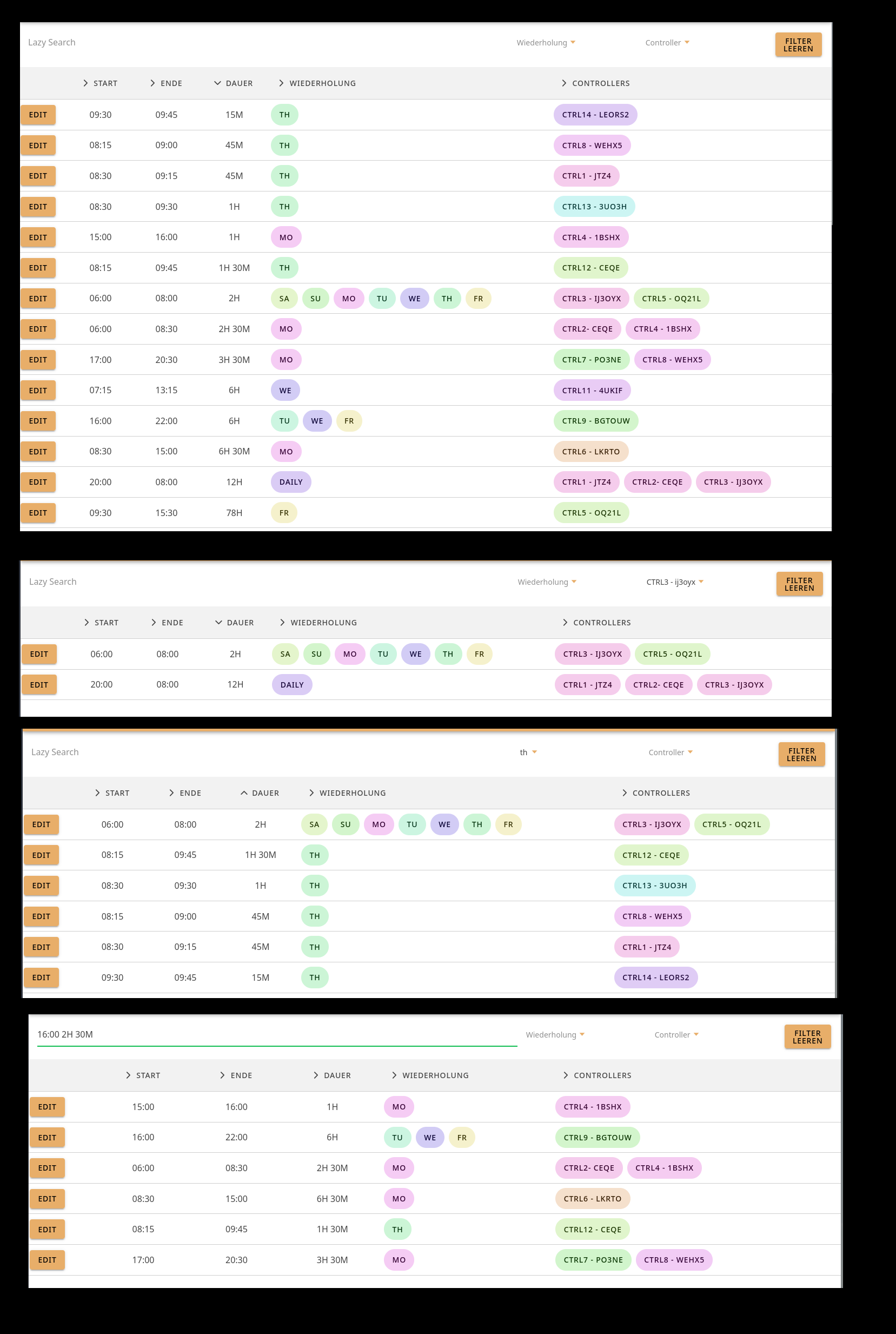
I now have this list, it allows for sorting all values. It also supports filtering for Recurrence Rules and Controllers. As well as Fuzzy Search for all Values.
(Editing/Creating/Deleting doesn’t work yet)

The Design is far from done :slight_smile:

Internally the List creates a new entry for Each Recurrence Rule, and then merges all matching entries before saving.
(So like “Daily CTRL7” will be merged with “Weekly CTRL7“ into “Weekly/Daily CTRL7”)
This way every entry in the list only has one rule to worry about, I think this is a good way to not make the UI super cluttered with list of list of list of rules.

While im currently focusing on just making it work with Controllers, the code should be easily adaptable to work with any Payload later, so this can be a reusable component.

It still needs to be made obvious for the user if Tasks Overlap tho, not entirely sure how to do that.

Any Input on how it is right now in regards to functionality? Concerns, Wishes, etc.?

Also I havent investigated yet how I can save data, so a bit for a direction would be appreciated :smiley:

1 Like

Hello again,

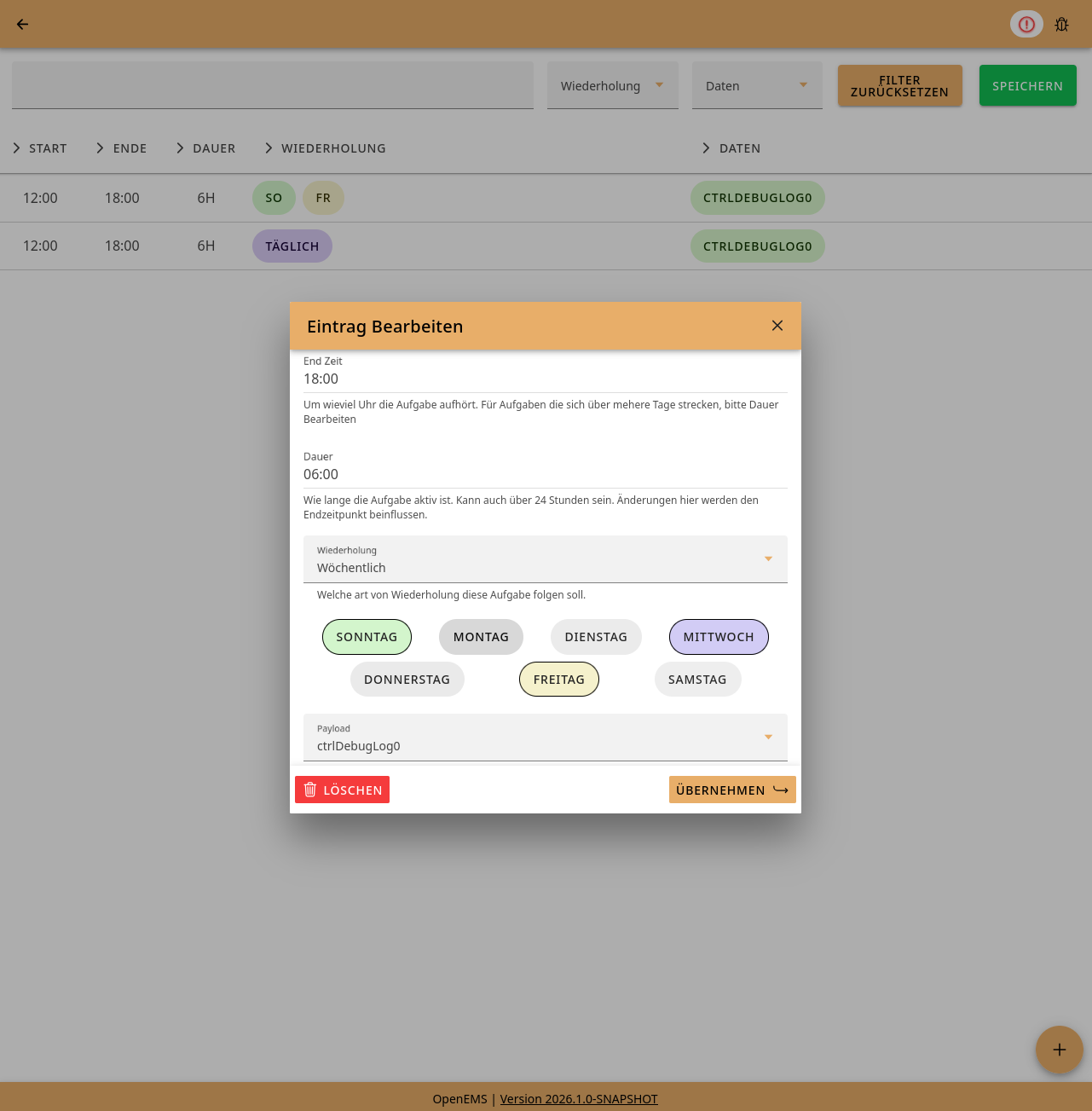
I now have a MVP! The list allows for modifying, deleting and creating, saving, discarding and loading :smiley: Translations are also added already.

Basically looks the same as the pictures from a week ago, except the edit modal which looks like this:

(Just to reiterate, the design isnt finished, but feedback is still welcome :D)

I have a few questions regarding how the user will use this component, @stefan.feilmeier you probably know the general direction this feature should go?

  • Does only one JSCalendar instance exist? So only one global JSCalendarScheduler managing everything?
  • If so, how are overlaps between Types managed (EV-Charing and MultiUse running at once)?
  • Should the UI show a warning when Tasks overlap? If so, is there an easy way to detect that?
  • If its just one Scheduler, does this mean the payload will be extended with new/other keys (currently only controllerIds)?
  • Our plan is now to add a widget to the live page, showing the current active controller. Clicking on this should open the List in a Modal. Opinions?
  • Additionally I would try to find a way to add a link into the settings page of the scheduler which will also show the list
  • Lastly im not sure how / if to handle one time events (no recurrences)? I feel like they dont have much of a use case in the project, and also wont be used that much, are they even handled by the Edge?

Thanks for your time and input

1 Like

Hello everyone,

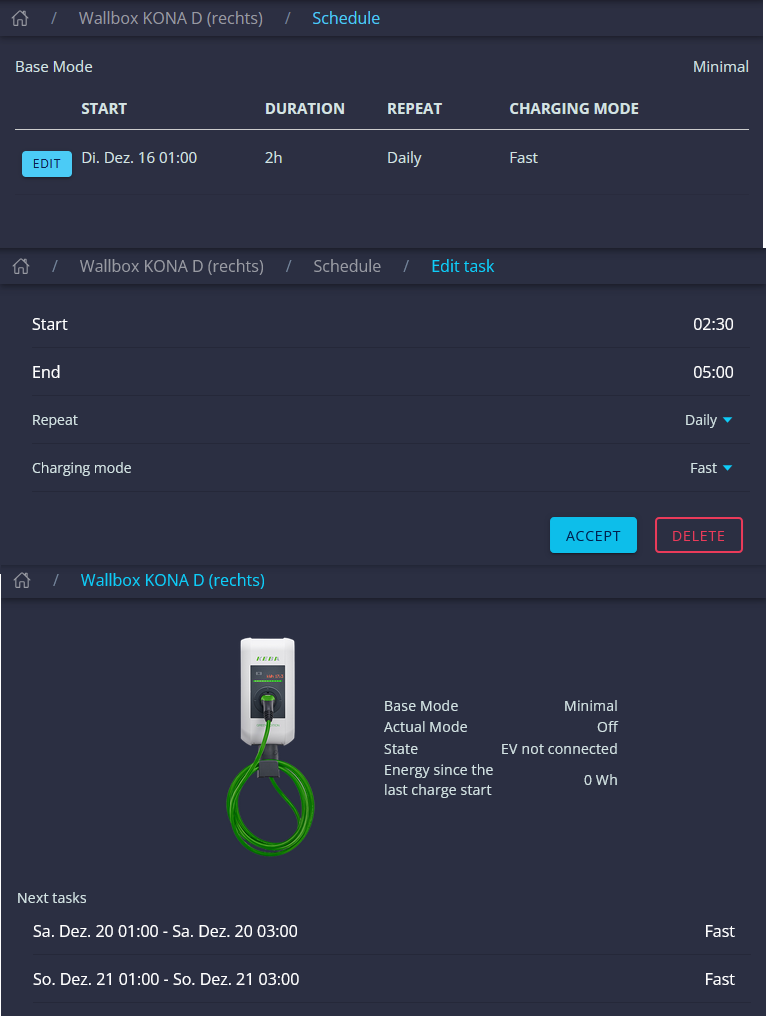
we at Fenecon have been working hard over the past few weeks to integrate manual time-based charging of EVs into the energy schedule. We also used JsCalendar Tasks for this. These changes are already available due the backport (2025-12-17).

Functionally, our implementation is already quite advanced. In terms of UI, we have focused more on making sure it works, and we are aiming for significant improvements at the beginning of next year.

Here is some information about our current status:

Basically, this is only available for the new EVSE architecture, which replaces the previous EVCS architecture. It is also only available in the new UI navigation. There is a ‘Schedule’ chip in the navigation. There we also have a tabular overview of the tasks, similar to the one @Floschy implemented. Although I have to admit that yours looks much better, good job!

You can then add tasks via a chip in the navigation. Currently, this is still limited to start and end times. The only recurrence rule currently available is ‘Daily‘, and you can select a charging mode. The edit page looks similar to the create page.

The next tasks are then displayed on the main page.

To add, edit, delete, and retrieve tasks, corresponding jsonrpc requests were also created on the Edge.

@Floschy, if you would like to, we would be very happy if you would also publish your code. You are also cordially invited to build your UI on ours.

Best regards,

Leonhard

Every component that uses a JSCalendar manages it’s own instance. I don’t think a shared instance across components makes much sense. The scheduler manages its own JSCalendare instance.

Best would be to not allow overlaps to ease the user experience. Overlaps create overhead in configuration and making the priorization of controllers easily visible. We would need to invest significant effort in making this visible and easily understandable for the user, with little benefit. Let’s try to enforce users to make an explicit configuration, allowing no overlaps, but defining periods and schedules clearly in one “block”. So let’s put some more effort in input validation and not allow overlaps.

Good idea in my opinion

I agree with that. And if somebody really needs it, there is the possibility to work around that by creating the schedule and remove it again once it occured. Not perfect, but does the job for such an edge case.

Heyho!

Im back working on this again after needing to do other things.

Since I have an MVP im currently looking into how to display, manage and edit the recurrence rules in a better way and given the lack of documentation regarding the JSCalendar logic im left with some questions. While yes, the implementation is trying to follow the JSCalendar Specs i’ve found some edge cases for which im not entirely sure how they are/should/will be handled, partly given that the JSCalendar logic isn’t fully written yet.

Here a TypeScript representation of how im interpreting the (relevant) Specs

This isnt exactly how the Spec define it, but a mix how im understanding the Specs in regards to what this feature should do and a bit of what the Java Implementation is currently doing.

/**
 * Format: ${year}-${month}-${date}T${hour}:${minutes}:${seconds}Z
 */
export type JSC_LocalDateTime = string;
/**
 * Format: P${weeks}W${days}D${hours}H${minutes}M${seconds}S
 *
 * if for example ${weeks}W == "0W", then this parameter can be just ""
 */
export type JSC_Duration = string;


export interface JSC_NDayJson {
    "@type": "NDay",
    "day": "mo" | "tu" | "we" | "th" | "fr" | "sa" | "su",
    "nthOfPeriod": number; // between -5 and 5 and never 0
}

export interface JSC_RecurrenceRuleJson {
    "@type": "RecurrenceRule",
    "frequency": "daily" | "weekly" | "monthly" | "yearly",
    "byDay"?: JSC_NDayJson[],
    "byMonth"?: string[], // months by number but as a string
    "byMonthDay"?: number[], // day of month -31 to 31. If day is out of range -> ignore
    "byWeekNo"?: number[], // weeks of the year from -53 to 53
    "byYearDay"?: number[], // days of the year from -366 to 366. If day is out of range -> ignore
};


export interface JSC_TaskJson<Payload> {
    "@type": "Task",
    "uid": string,
    "title"?: string,
    "description"?: string,
    "start"?: JSC_LocalDateTime,
    "until"?: JSC_LocalDateTime,
    "duration"?: JSC_Duration,
    "recurrenceRules"?: JSC_RecurrenceRuleJson[],
    "excludeRecurrenceRules"?: JSC_RecurrenceRuleJson[],
    /** key = isoDate */
    "recurrenceOverride"?: Record<JSC_LocalDateTime, JSC_RecurrenceOverride>,
    "openems.io:Payload": Payload
}
export type JSC_RecurrenceOverride = {
    "start"?: JSC_LocalDateTime,
    "duration"?: JSC_Duration,
};

First of all, is this Interpretation of the Specs correct? and will it be implemented like that at some point?

  1. Looking at the code it seems like the daily frequency doesn’t have any parameters
    Is this assumption correct? Because Technically every frequency can have every “by…” rule. But that means frequencies are somewhat redundant.
    For example you can say {frequency: “daily”, byYearDay: [5]} which behaves the same way as any other frequency. (As far as I understand it)
    So the frequency parameter may as well be discarded.

  2. The weekly frequency only runs on the given byDay (weekdays)?
    Here is the same thing as daily: by the looks of things the code (currently) only supports this option while all the other options are still valid according to the specs.

  3. For monthly it gets more complicated.

    it has a byMonthDay parameter which contains an int array like 1, 6, 24 (meaning the task should run on those day of the month). But this parameter - as i understand it - is only expected when the skip parameter of the recurrenceRule is set to omit which is only the case when using a calendar format without leap years. Since the we are using the Gregorian Calendar, this is not the case, so its never omit , so theoretically byMonthDay is not a valid parameter here, even though it’d be fairly useful in my opinion.

  4. When a Task has multiple recurrenceRules for example
    1: ”Every Monday”
    2: “Every Friday”
    (disregarding the fact that they could be written as one Rule) are they handled in an additive way (aka. “Monday and Friday") or are they handled in an overlap way (aka “Never” (because Monday and Friday dont overlap))?

    I can imagine that separate Recurrence rules are Additive while a single Rule’s by-“filters” are over overlaps, like:
    1: “Every Monday”
    2: “Yearly during JAN-SEP on Fridays” (...frequency: “yearly”, byDay: [“Fr”], byMonth: [...)
    Resulting in “Every Monday and every (Friday during Janunary till September).”
    Is this assumption correct?

Further more the Specs define things like firstDayOfWeek, bySecond, byMinute, byHour, interval or until. While the first 5 only have debatable purpose here, an until parameter however would be very useful i can image. While on the other hand rscale(+skip) is completely useless for this usecase.

Another Question which has presented itself to me is that excludedRecurrenceRules as well as recurrenceOverrides remain unseen in the “backend”. So are there plans to support those in the Future?

Especially recurrenceOverrides which allows you to specify a given Task should run once at an arbitrary moment in time, can be pretty handy i believe.

But excludedRecurrenceRules can be a powerful tool as well. If you for example want to run a Task during the week but another on the Weekend and have a half-a-year schedule like
”I want to run A during the summer and B during the winter, but C at all Weekends”
Using excludes it would be fairly easy to just say

  • A: Run in the Summer months, but exclude Saturday and Sunday
  • B: Run in the Winter months, but exclude Saturday and Sunday
  • C: Run every Saturday and Sunday

Also since

JSCalendar.Tasks by design do not support overlapping OneTask. This is intended behaviour. Instead Tasks respect the priority given by the position in the JSON Array.
The JUnit tests show this behaviour

im wondering how overlapping tasks could be detected and shown to the user so they know their configuration might not run as they’ve intended. Sure i can just give everything a priority, but that doesnt really properly communicate to the user what that actually means and if there are collisions…

I very likely wont implement all the features i’ve mentioned here since they aren’t supported (yet) or require really good UI in order to be useful for anyone, and im quite frankly not this good.
It’d be nice to have an idea of what will be possible - at some point - though, so i can make everything future proof (to the best of my abilities).

Thats a lot of text, here the TL;DR of Questions
  1. Is my Specs interpretation correct?
  2. What features are gonna end up in the EMS implementation of the JSCalendar Specs
  3. Which parameters are allowed for each frequency we support / Are Frequencies of any use?
  4. How are multiple RecurrenceRules handled
  5. What about values like until? Are they relevant? Will they be supported?
  6. Whats the plan for excludedRecurrenceRules or recurrenceOverrides? Or rather more complicated schedules in general
  7. How can I detect Task overlaps in order to show them to the user